Configure SCIM User Provisioning
The Provisioning Settings page allows an administrator to configure the settings required for WFO to provision users from an identity provider using the SCIM protocol.
Part of the configuration is the selection of other employee fields that can only be managed through the SCIM API. Fields synchronized with SCIM are not editable through the WFO user interface or user management API.
Before you begin
An administrator must have the System Management Module that allows performing suite-wide system management activities from a single, Web-based application, the Enterprise Manager.: Configure Feature Settings: Configure Provisioning Settings privilege Permissions associated with each role that define the features of the application a user is able to view and the functionality in the application the user can access..
Procedure
-
Go to System Management. Under General Settings, select Feature Settings.
-
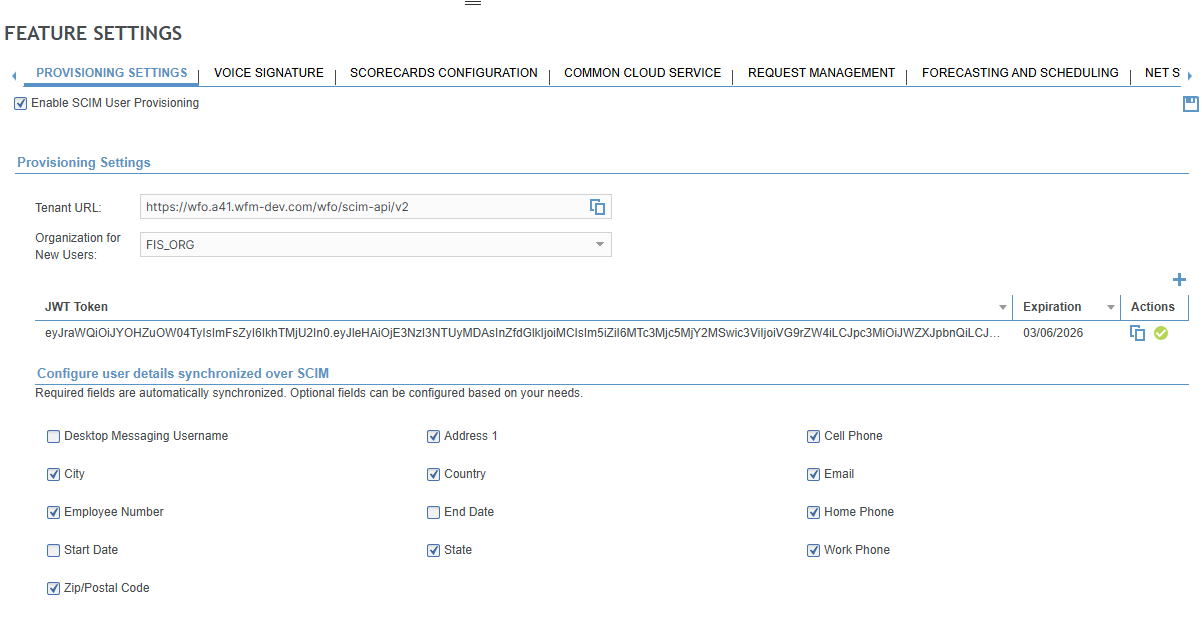
Select the Provisioning Settings tab.
-
To enable the SCIM provisioning settings, set Enable SCIM User Provisioning.
-
Configure the SCIM provisioning settings.
-
Save your changes by selecting
 .
.
SCIM Provisioning Settings
|
Setting |
Description |
|---|---|
|
Tenant URL |
The Identity Service acts as a SCIM gateway between your identity provider and Verint identity-enabled products and services. The URL identifies the gateway to your identity provider. |
|
Organization for New Users |
Select from the list of existing organizations in your system that newly provisioned users are added to. |
|
JWT Token |
The JSON Web Token (JWT) token is required for authentication when your identity provider connects to the WFO application using the SCIM protocol during the provisioning process. When you create a token, you can set its expiry date. You can also revoke any of the existing tokens from this page at any time. |
|
Configure user details synchronized over SCIM |
When WFO is configured for user provisioning using an identity service, the following fields are read-only in the WFO user interface and only manageable through SCIM:
In addition to those fields, you can also select any of the following user details fields to be synchronized with SCIM:
|
Identity Service provisioning configuration (On-premises environment) (User Management Module that an administrator uses to create a profile for each employee in their organization. Guide)